A friend of mine is interested in creating Japanese word clouds using his own tweets. He is a bright young math student from Taiwan. He can fluently speak Japanese as well as English, Taiwanese and (of course) Chinese. He expresses his thoughts in Japanese every now and then; he has many Japanese tweets in addition to English and Chinese. It will surely be fun to make clouds with them. This is how I have got interested in making my own clouds with our conversations which involve English, Japanese, Chinese and other languages.
Making Chinese & Japanese word clouds, by the way, is harder than it looks. Words are not segmented in both languages. To make clouds, you first need to detect every single word in sentences correctly. Here is an example sentence from Wikipedia : 大安區位於中華民國臺北市的中心偏南,是臺北市人口最多的行政區。 (if your computer displays just blank squares or rectangular boxes with “X” or question mark inside, please install Chinese language pack onto your Windows or fonts onto your Linux computer). As you see, there is no white space between the words and punctuation marks. But there is no need to be upset either. Thanks to the state-of-the-art part-of-speech (POS) taggers and morphological analyzers, it is surprisingly easy to split sentences into separated words. Although their outputs are not always one-hundred percent accurate, they return acceptable results most of the time. Almost always on non-colloquial, formally written text.
I am going to write about extraction of Chinese/Japanese sentences in part 1. and usages of a POS tagger and Morph. analyzer in part 2. And finally making clouds from word frequencies in part 3.
Before proceeding further, I would ask you to set your terminal charset to UTF-8. I also display the version information for Python, its packaging manager and my operating system.
$ python --version
Python 3.6.4 :: Anaconda custom (64-bit)

$ pip --version
pip 10.0.1 from /home/femoghalvfems/anaconda3/lib/python3.6/site-packages/pip (python 3.6)

$ cat /proc/version
Linux version 4.13.0-39-generic (buildd@lcy01-amd64-024) (gcc version 5.4.0 20160609 (Ubuntu 5.4.0-6ubuntu1~16.04.9)) #44~16.04.1-Ubuntu SMP Thu Apr 5 16:43:10 UTC 2018

$ echo $LANG
en_US.UTF-8
Part 1. Extract Chinese/Japanese sentences
Because we always switch from speaking one language to another while talking, our first task is to extract Chinese or Japanese sentences from our conversations where more than 3 languages are mixed up!
If you are thinking to make word clouds from sentences written solely in Chinese or Japanese, please skip this part.
I conducted a sentence classification task using “guess-language” library.
$ pip install guess_language-spirit
#!/usr/bin/env python
# -*- coding: UTF-8 -*-
import sys
from guess_language import guess_language

def add_language_label():
    if(len(sys.argv)!=2):
        sys.exit("Usage: $ python %s <filename>" % sys.argv[0])
    with open(sys.argv[1],"r") as ins:
        for line in ins:
            print(guess_language(line) +'\t'+line.rstrip())

if __name__ =='__main__':
    add_language_label()
$ python guess_lang.py YOURINPUT.txt > tmp01.txt
$ grep -e '^zh\s' tmp01.txt | cut -f 2 > tmp02_zh.txt
$ grep -e '^ja\s' tmp01.txt | cut -f 2 > tmp02_ja.txt
Part 2.1 Segment Chinese Sentences using Stanford Word Segmenter
I choose Stanford segmenter. It is a modern word segmenter written in Java. It is very easy to use and works efficiently on Chinese and Arabic text. The software can be downloaded from https://nlp.stanford.edu/software/segmenter.html. Please download the latest version and unzip the downloaded file.
$ unzip ~/Downloads/stanford-segmenter-2018-02-27.zip
And then run “segment.sh” script with option parameters “pku”, “UTF-8”, and “0”. They specify the corpus — either Peking University Treebank (pku) or Penn Chinese Treebank (ctb), character encoding and the size of the N-best lists for each sentence.
$ ./stanford-segmenter-2018-02-27/segment.sh pku tmp02_zh.txt UTF-8 0 > tmp03_zh.txt
The segmenter splits sentences into elements. Once completed, you get the sentences with the words separated.
阿里山區 的 林相 豐富 , 從亞 熱帶 的 闊葉 林 到 寒帶 的 針葉 林 都 有 。 800 公尺 以下 丘陵 為熱帶 林相 , 主要 由 相思樹 、 構樹構 成 。 800 ~ 1,000 公尺 是 以 樟樹 、 楓樹 、 楠 樹和殼 斗 科 植物 為主 的 暖帶 林相 。 1,800 ~ 3,000 公尺 左 右 的 林相 為溫帶 林 , 紅檜 、 臺灣 扁柏 、 台灣 肖楠 、 鐵杉 及 華山松 稱為 阿里山 五 木 在 此 大量 生長 , 阿里山 的 千 年 檜木 群 是 目前 臺灣 最 密集 的 巨 木 群 。 3,000 ~ 3,500 公尺 主要 是 臺灣 冷杉 , 呈 現寒帶 林 的 林相 。

阿里山 國家風 景 區內 主要 景點 包括 位於 阿里山鄉 的 阿里山 國家 森林 遊樂區 、 豐山 、 來吉 、 特 富野 、 達邦 、 樂野 、 里 佳 、 山 美 、 新 美及 茶山 ; 位於 梅山鄉 的 太和 、 瑞 里 、 瑞 峰 、 太興 、 碧湖 、 龍眼 及 太平 ; 位於 竹崎鄉 的奮 起 湖 、 石棹 、 光華 、 仁壽 、 金 獅及 文峰 ; 以及 位於 番 路鄉 的 半 天 岩 、 觸口 、 隙頂 及 巃頭 等 。

區內 自然 景 觀極 為豐 富 , 日出 、 雲海 、 晚霞 、 神木 與鐵 道 並列為 「 阿里山 五奇 」 , 而 「 阿里山 雲海 」 更 是 台灣 八 景 之一 。
但 在 原 阿里山 神木 傾倒後 , 林 務局 改 以 阿里山 神木 群 取代 之 。 此外 尚 有沼 平 公園 、 姐妹 潭 、 祝 山等景點 。
You now can count the frequency usage of each word, right? Before jumping to conclusions, I would like you to consider avoiding counting function words. The function words are grammatical words. Some examples of function words in English are auxiliary verbs, determiners and prepositions.
They appear way too often in text and harm statistics. Furthermore, they alone do not have significant meanings. The above Chinese sentences also have ‘的’ possessive particle and ‘及’ conjunction. By removing these, the cloud becomes more informative, attractive and interesting.
I propose to extract only (proper) nouns using a POS tagger so you can make explanatory word clouds. If you agree, please download Stanford tagger from https://nlp.stanford.edu/software/tagger.html and run the software.
$ unzip ~/Downloads/stanford-postagger-full-2018-02-27.zip
$ java -mx1024m -cp ./stanford-postagger-full-2018-02-27/stanford-postagger.jar edu.stanford.nlp.tagger.maxent.MaxentTagger -model ./stanford-postagger-full-2018-02-27/models/chinese-distsim.tagger -textFile tmp03_zh.txt > tmp04_zh.txt
The POS tagger assigns parts of speech to each word. When you examine the output, you will soon find the parts of speech labeled at the end of the words. If you are not familiar with them, you can find the complete list of the tags at https://verbs.colorado.edu/chinese/posguide.3rd.ch.pdf.
阿里山區#NR 的#DEG 林相#NN 豐富#VV ,#PU 從亞#VV 熱帶#VV 的#DEC 闊葉#NN 林#NN 到#VV 寒帶#NN 的#DEG 針葉#NN 林#NN 都#AD 有#VE 。#PU 800#CD 公尺#M 以下#LC 丘陵#NN 為熱帶#NN 林相#NN ,#PU 主要#AD 由#P 相思樹#NR 、#PU 構樹構#NR 成#VV 。#PU 800#CD ~#PU 1,000#CD 公尺#M 是#VC 以#P 樟樹#NN 、#PU 楓樹#NN 、#PU 楠#NN 樹和殼#NN 斗#VV 科#NN 植物#NN 為主#VV 的#DEC 暖帶#NN 林相#NN 。#PU 1,800#CD ~#PU 3,000#CD 公尺#M 左#NN 右#NN 的#DEG 林相#NN 為溫帶#NN 林#NN ,#PU 紅檜#NN 、#PU 臺灣#NN 扁柏#NN 、#PU 台灣#NR 肖楠#NR 、#PU 鐵杉#NR 及#CC 華山松#NR 稱為#VV 阿里山#NR 五#CD 木#NN 在#P 此#PN 大量#CD 生長#NN ,#PU 阿里山#NR 的#DEG 千#CD 年#M 檜木#NN 群#NN 是#VC 目前#NT 臺灣#NN 最#AD 密集#VA 的#DEC 巨#JJ 木#NN 群#NN 。#PU 3,000#CD ~#PU 3,500#CD 公尺#M 主要#AD 是#VC 臺灣#VV 冷杉#NN ,#PU 呈#VV 現寒帶#NN 林#NN 的#DEG 林相#NN 。#PU

阿里山#NR 國家風#NN 景#NN 區內#NN 主要#AD 景點#VV 包括#VV 位於#VV 阿里山鄉#NR 的#DEG 阿里山#NR 國家#NN 森林#NN 遊樂區#NN 、#PU 豐山#NR 、#PU 來吉#NR 、#PU 特#AD 富野#VA 、#PU 達邦#NN 、#PU 樂野#NN 、#PU 里#LC 佳#VA 、#PU 山#NN 美#NR 、#PU 新#JJ 美及#NN 茶山#NR ;#PU 位於#VV 梅山鄉#NR 的#DEG 太和#NR 、#PU 瑞#NN 里#LC 、#PU 瑞#NR 峰#NN 、#PU 太興#NN 、#PU 碧湖#NN 、#PU 龍眼#NN 及#CC 太平#NN ;#PU 位於#VV 竹崎鄉#NR 的奮#VV 起#VV 湖#NN 、#PU 石棹#NN 、#PU 光華#NN 、#PU 仁壽#NN 、#PU 金#JJ 獅及#NN 文峰#NN ;#PU 以及#CC 位於#VV 番#M 路鄉#NN 的#DEG 半#CD 天#M 岩#NN 、#PU 觸口#NN 、#PU 隙頂#NN 及#CC 巃頭#NN 等#ETC 。#PU

區內#NN 自然#AD 景#NN 觀極#VV 為豐#NN 富#NN ,#PU 日出#NN 、#PU 雲海#NN 、#PU 晚霞#NN 、#PU 神木#NN 與鐵#NN 道#NN 並列為#NN 「#PU 阿里山#NR 五奇#NR 」#PU ,#PU 而#AD 「#PU 阿里山#NR 雲海#VV 」#PU 更#AD 是#VC 台灣#NR 八#CD 景#NN 之一#NN 。#PU
但#AD 在#P 原#JJ 阿里山#NR 神木#NN 傾倒後#NN ,#PU 林#NN 務局#NN 改#VV 以#P 阿里山#NR 神木#NN 群#NN 取代#VV 之#DEC 。#PU 此外#AD 尚#AD 有沼#VV 平#VV 公園#NN 、#PU 姐妹#NN 潭#VV 、#PU 祝#VV 山等景點#NN 。#PU
It has become very easy to extract (proper) nouns from the text. If you want to include verbs, adverbs and adjectives, please add “VV”, “AD” and “JJ” into the POS_TAGS string in the line 6. And save the script as “count_word_zh.py”.
#!/usr/bin/env python
# -*- coding: UTF-8 -*-
import sys,re
from collections import Counter

POS_TAGS="(\#(NR|NN))"

def count():
    if(len(sys.argv)!=2):
        sys.exit("Usage: $ python %s " % sys.argv[0])
    words=[]
    with open(sys.argv[1],"r") as ins:
        for line in ins:
            array=line.rstrip().split(' ')
            for item in array:
                if re.search(POS_TAGS,item) is None:
                    continue
                words.append(re.sub(POS_TAGS,'',item))
    for word, frequency in Counter(words).most_common():
            print(word+','+str(frequency))

if __name__ =='__main__':
    count()
Execute the count_word_zh.py script and make a word frequency ranking list (wf_zh.txt).
$ python count_word_zh.py tmp04_zh.txt > wf_zh.txt
You can make a Chinese word cloud with this word frequency list file. Please proceed to Part 3. Generating Word Clouds.
阿里山,38
山,16
林,11
森林,10
湖,9
景,8
台灣,8
景點,8
笠原山,8
玉山,6
山脈,6
風景區,5
遊樂區,5
神木,5
林相,5
文化,5
瑞,5
溪,5
谷,5
國家,4
嘉義縣,4
阿里山鄉,4
群,4
鄒族,4
日出,4
...
Part 2.2 Segment Japanese Sentences using MeCab
Despite its all complex features — such as its mix of writing systems, verb conjugations and null subjects/objects — Japanese language processing can be carried out in the same way as other languages. This is largely due to the amount of available language resources and powerful processing tools. There are a large number of corpora, both annotated and unannotated, and several sentence tokenizers out there.
MeCab is one of the most widely-used software of its sort. The program is used not only by researchers and professional programmers but also non-professional, hobby corders and analysts with no programming skills to analyze Japanese sentences.
You can install the software using a package manager or download one from https://github.com/taku910/mecab.
$ sudo apt install mecab
$ sudo apt install libmecab-dev
$ sudo apt install mecab-ipadic-utf8
If you would like to use the word segmentation function, set the program’s output parameter to “wakati” — abbreviation for wakachi-gaki (written with spaces).
$ cat tmp02_ja.txt | mecab -O wakati
植物 は 、 熱帯 ・ 暖帯 ・ 温帯 の 植物 が 見 られる 。 1800m 以上 に なる と 樹齢 1000年 を 超える タイワンヒノキ ( 中国語 : 紅 檜 ) が 多く 自生 し て おり 、 靖国神社 の 神門 や 橿原神宮 の 神門 と 外 拝殿 、 東大寺大仏殿 の 垂木 など 、 日本 の 多く の 神社 仏閣 に 阿里山 の タイワンヒノキ が 使わ れ て いる 。

さらに 明治神宮 の 一 代目 大鳥居 に も 使わ れ て い た が 、 1966年 7月22日 の 落雷 で 破損 し 、 現在 大宮氷川神社 の 二 の 鳥居 として 移築 さ れ た 。

台湾 最高峰 の 玉山 山系 から 顔 を 出す 日の出 は 息 を のむ 美し さ と 言わ れ て いる 。
It is also a good idea to prepare a relatively new dictionary which contains many proper nouns and compound nouns.
$ git clone --depth 1 git@github.com:neologd/mecab-ipadic-neologd.git
$ cd mecab-ipadic-neologd
$ ./bin/install-mecab-ipadic-neologd -n
Once you install the Neologd dictionary, you can use it together with the analyzer. Please specify the path of the dictionary, when you run MeCab.
$ cat tmp02_ja.txt | mecab -d /usr/lib/mecab/dic/mecab-ipadic-neologd > tmp03_ja.txt
When you execute the program, MeCab assigns parts of speech, basic form and reading aids to each word of the given sentences.
台湾	名詞,固有名詞,地域,国,*,*,台湾,タイワン,タイワン
最高峰	名詞,一般,*,*,*,*,最高峰,サイコウホウ,サイコーホー
の	助詞,連体化,*,*,*,*,の,ノ,ノ
玉山	名詞,固有名詞,人名,姓,*,*,玉山,タマヤマ,タマヤマ
山系	名詞,一般,*,*,*,*,山系,サンケイ,サンケイ
から	助詞,格助詞,一般,*,*,*,から,カラ,カラ
顔	名詞,一般,*,*,*,*,顔,カオ,カオ
を	助詞,格助詞,一般,*,*,*,を,ヲ,ヲ
出す	動詞,自立,*,*,五段・サ行,基本形,出す,ダス,ダス
日の出	名詞,一般,*,*,*,*,日の出,ヒノデ,ヒノデ
は	助詞,係助詞,*,*,*,*,は,ハ,ワ
息	名詞,サ変接続,*,*,*,*,息,イキ,イキ
を	助詞,格助詞,一般,*,*,*,を,ヲ,ヲ
のむ	動詞,自立,*,*,五段・マ行,基本形,のむ,ノム,ノム
美し	形容詞,自立,*,*,形容詞・イ段,ガル接続,美しい,ウツクシ,ウツクシ
さ	名詞,接尾,特殊,*,*,*,さ,サ,サ
と	助詞,格助詞,引用,*,*,*,と,ト,ト
言わ	動詞,自立,*,*,五段・ワ行促音便,未然形,言う,イワ,イワ
れ	動詞,接尾,*,*,一段,連用形,れる,レ,レ
て	助詞,接続助詞,*,*,*,*,て,テ,テ
いる	動詞,非自立,*,*,一段,基本形,いる,イル,イル
。	記号,句点,*,*,*,*,。,。,。
EOS
All the information is provided in Japanese, nevertheless you do not have to be fluent in the language to make word clouds. What is important is you detect the part of speech the words belong to. Here I show a small list of the major parts of speech in Japanese. You can find the complete list at http://www.omegawiki.org/Help:Part_of_speech/ja.
|
romanized |
definition |
Corresponds to |
| 品詞 |
Hinshi |
parts of speech |
– |
| 名詞 |
meishi |
noun |
NN,NR |
| 代名詞 |
daimeishi |
pronoun |
PN |
| 動詞 |
doushi |
verb |
VV |
| 形容詞 |
keiyoushi |
adjective |
AD,JJ |
| 副詞 |
fukushi |
adverb |
AD |
| 接続詞 |
setsuzokushi |
conjunction |
CC,CS |
| 助詞 |
joshi |
particle |
– |
With this list and the MeCab output (tmp03_ja.txt), you can extract (proper) nouns from your input sentences.
#!/usr/bin/env python
# -*- coding: UTF-8 -*-
import sys,re
from collections import Counter

POS_TAGS="名詞"
#POS_TAGS="固有名詞"

def count():
    if(len(sys.argv)!=2):
        sys.exit("Usage: $ python %s " % sys.argv[0])
    words=[]
    with open(sys.argv[1],"r") as ins:
        for line in ins:
            array=line.rstrip().split('\t')
            if (len(array)<2):
                continue
            pos=array[1].split(',')[0]
            #pos=array[1].split(',')[1]
            if re.search(POS_TAGS,pos) is None:
                continue
            words.append(array[0])
    for word, frequency in Counter(words).most_common():
            print(word+','+str(frequency))

if __name__ =='__main__':
    count()
If you want to include verbs, adverbs and adjectives, please add “動詞”, “副詞” and “形容詞” into the POS_TAGS string in the line 6.
And if you want to extract only proper nouns, please replace "名詞" with "固有名詞", which is Japanese counterpart for proper nouns, in the line 6. Delete the line 18 and uncomment 19.
Then save the script as “count_word_ja.py” and execute it.
$ python count_word_ja.py tmp03_ja.txt > wf_ja.txt
阿里山,9
鉄,8
嘉義駅,6
神木,5
台湾,4
日本,4
台,4
嘉義県,3
面積,3
日の出,3
タイワンヒノキ,3
...
Part 3. Generating Word Clouds
Congratulations! You now have almost everything you need to create word clouds in Python -- except WordCloud library. Please install the library.
$ pip install wordcloud
And execute the following script with adding the input file path (word frequency file), the output file path (png image file) and the path of Chinese/Japanese fonts.
#!/usr/bin/env python
# -*- coding: UTF-8 -*-
import csv,sys
from wordcloud import WordCloud

def make_cloud():
    if(len(sys.argv)!=4):
        sys.exit("Usage: $ python %s   " % sys.argv[0])
    reader = csv.reader(open(sys.argv[1],'r',newline='\n'))
    d={}
    for k,v in reader:
        d[k]=int(v)

    wordcloud = WordCloud(background_color="white",
    font_path=sys.argv[3],
    width=800,height=600, max_words=1000,relative_scaling=1,normalize_plurals=False).generate_from_frequencies(d)
    wordcloud.to_file(sys.argv[2])

if __name__ =='__main__':
    make_cloud()
For Chinese:
$ sudo apt install fonts-wqy-zenhei # install Chinese fonts
$ python make_word_cloud.py wf_zh.txt cloud_zh.png "/usr/share/fonts/truetype/wqy/wqy-zenhei.ttc"
$ eog cloud_zh.png
For Japanese:
$ sudo apt install fonts-takao # install Japanese fonts
$ python make_word_cloud.py wf_ja.txt cloud_ja.png "/usr/share/fonts/truetype/takao-mincho/TakaoMincho.ttf"
$ eog cloud_ja.png
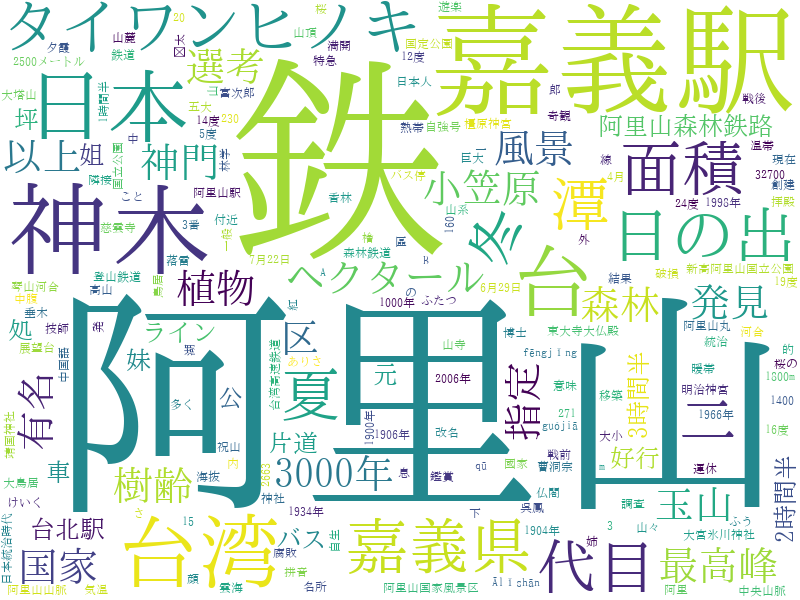
Here are samples of word clouds created using Wikipedia articles.

阿里山國家風景區 Alishan National Scenic Area in Chinese Language
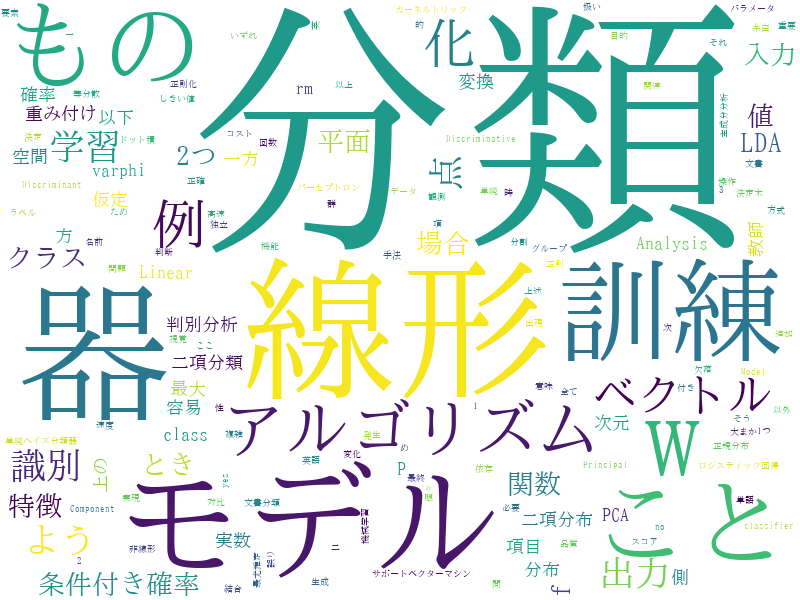
線形分類器 Linear classifiers in Japanese Language
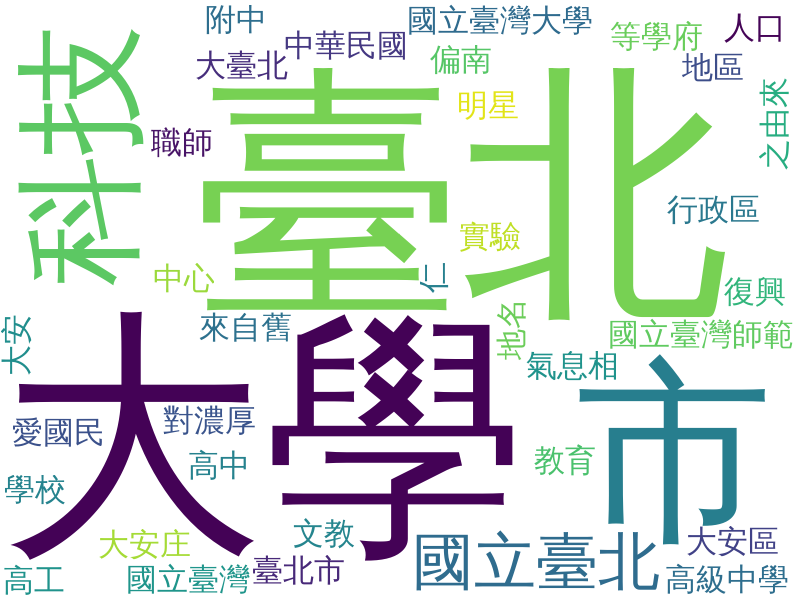
大安區 (臺北市) Taipei Da'an District in Chinese Language
See also: Chinese Word Counting Made Easy with the Command Line